Gaming docks for laptops sit between a standard USB-C hub and a full desktop docking station, and their value depends heavily on whether you need high-bandwidth display output, low-latency peripherals, and stable GPU passthrough for gaming monitors. The most important factor is the connection type—Thunderbolt 4, Thunderbolt 5, or USB4—because these determine whether you can reliably run dual monitors at 144Hz or 4K 60Hz without compression or lag.
This guide covers the best gaming docks for laptops, focusing on Thunderbolt and USB4 docks that support high-refresh external displays, fast peripheral connectivity, and stable performance for gaming setups. It also breaks down what actually matters—like bandwidth limits, display support, and latency behavior—so you can choose a dock that works for both gaming and everyday productivity.
1. Razer Usb 4 Dock

The Razer USB 4 Dock is ideal for professionals, gamers, and tech enthusiasts who require a versatile and high-performance docking station to expand their laptop or phone connectivity. If you need to connect multiple devices simultaneously, support dual 4K monitors, and benefit from fast charging in a compact, durable design, this dock is an excellent choice. It is especially suited for users who work on both Windows and Mac platforms and want a reliable all-in-one solution.
Pros:
- Features 14 versatile ports, including Type C, Type A, HDMI, DP, Ethernet, SD, and 3.5mm audio jack
- Supports dual monitor setups with resolutions up to 4K at 120 Hz for stunning visuals
- Offers fast charging for both laptops and phones, reducing downtime
- Constructed with a durable, lightweight casing for portability and longevity
- Compatible with both Windows and Mac operating systems, ensuring broad usability
Cons:
- Relatively larger dimensions may take up more desk space compared to smaller docks
- Premium features come with a higher price point which might not suit budget users
The Razer USB 4 Dock excels in providing an extensive range of connectivity options, making it a true hub for multiple devices. Its ability to support dual 4K monitors at 120 Hz is a significant advantage for users who demand high-resolution displays for gaming, video editing, or professional multitasking. The inclusion of both Type C and Type A ports ensures compatibility with a wide variety of peripherals, while the Ethernet port guarantees stable and fast internet connectivity.
Beyond connectivity, the dock’s fast charging capabilities help maintain productivity by quickly powering laptops and phones. The thoughtfully designed durable yet lightweight casing makes it easy to carry without sacrificing resilience, ideal for users who travel or move between workstations frequently. Overall, this dock delivers a seamless and powerful experience for anyone looking to enhance their workspace efficiently.
To buy this product, click here.
2. Razer Thunderbolt 5 Dock Chroma

The Razer Thunderbolt 5 Dock Chroma is ideal for tech enthusiasts, creative professionals, and power users who demand high-speed connectivity and multiple display support from a sleek and efficient docking station. If you own a Thunderbolt 5 or 4 compatible laptop and need to connect multiple peripherals while enjoying fast data transfer and reliable power delivery, this docking station is designed for you.
Pros:
- Supports up to 3x 4K displays at 144 Hz for an immersive multi-monitor setup
- Ultra-fast 120Gbps transfer speeds for seamless data handling
- Includes an M.2 SSD slot for expandable, high-speed storage
- 140W power delivery to charge laptops efficiently
- Active cooling system to maintain optimal performance
- Compact and sleek black design that fits modern workspaces
- TB Share feature allowing easy sharing of Thunderbolt devices
Cons:
- May be priced higher compared to simpler docking stations
- Limited to devices with Thunderbolt 4/5 compatibility
- Relatively larger footprint may not suit all desk setups
The Razer Thunderbolt 5 Dock Chroma boasts an impressive array of features that cater to high-performance computing needs. Its ability to support three 4K monitors at 144 Hz ensures users can enjoy crystal-clear visuals and smooth graphics, perfect for gaming, video editing, and multitasking. The inclusion of an M.2 SSD slot allows users to expand their storage directly on the dock, which significantly improves workflow efficiency by providing quick access to large files and fast data transfers.
Additionally, the dock’s 120Gbps transfer speed means that large files move quickly between devices, reducing wait times and improving productivity. The 140W power delivery ensures that even power-hungry laptops stay charged during intensive use, while the active cooling system prevents overheating, maintaining the dock’s performance and longevity. With its elegant black finish and compact dimensions, this docking station not only enhances connectivity but also complements any workspace aesthetic.
To buy this product, click here.
3. Razer Thunderbolt 4 Dock

The Razer Thunderbolt 4 Dock is ideal for professionals and tech enthusiasts who require a powerful and versatile connectivity solution. If you need to connect multiple devices, support high-resolution displays, and enjoy fast data transfer speeds on both Mac and PC, this dock is designed for you. Gamers, content creators, and remote workers will especially benefit from its comprehensive port selection and reliable performance.
Pros:
- 10 ports in 1 dock for extensive connectivity options
- Supports dual 4K or single 8K video output for stunning visuals
- USB A and C hub compatibility for various peripherals
- 2.5 GbE Thunderbolt 3 port ensuring ultra-fast network speeds
- Thunderbolt 4 certified for guaranteed performance and compatibility
- Passthrough charging to keep your laptop powered while connected
- Chroma RGB lighting adds a stylish touch to your workspace
- Compact and lightweight design (0.75 pounds) for portability
Cons:
- Higher price point compared to basic docking stations
- Limited to devices that support Thunderbolt 3 or 4
- May require additional cables for full functionality
The Razer Thunderbolt 4 Dock offers a rich suite of features designed to enhance productivity and streamline your workspace. Its ability to support dual 4K or single 8K displays makes it perfect for users who demand high-resolution visuals for video editing, gaming, or multitasking. The integration of both USB A and C ports allows seamless connection of a wide range of peripherals, from external drives to keyboards and mice.
Additionally, the dock’s 2.5 GbE Thunderbolt 3 port ensures lightning-fast network speeds, ideal for large file transfers or low-latency online gaming. With Thunderbolt 4 certification, users can be confident in its compatibility and performance with the latest laptops and devices. The inclusion of passthrough charging means your laptop remains powered without cluttering your desk with extra chargers, while the customizable Chroma RGB lighting adds a personalized and modern aesthetic to your setup.
To buy this product, click here.
4. Anker Laptop Docking Station Dual Monitor

The Anker Laptop Docking Station Dual Monitor is ideal for professionals, students, and tech enthusiasts who require enhanced productivity through multiple displays and versatile connectivity options. If you use a USB-C compatible laptop like the XPS and need a compact yet powerful hub to connect dual 4K monitors, transfer data, and charge your device simultaneously, this docking station is tailored for you.
Pros:
- Supports dual 4K HDMI monitors for an immersive viewing experience and multitasking efficiency.
- 8-in-1 USB C hub offers a wide range of ports including Ethernet, SD card reader, and USB ports for versatile connectivity.
- 85W Power Delivery ensures your laptop stays charged while connected to multiple devices.
- Compact and lightweight design (gray color, weighing only 0.2 pounds) makes it highly portable.
- 1 Gbps Ethernet port provides stable and high-speed internet connectivity.
Cons:
- Charger not included, so you need to use your existing power adapter or purchase separately.
- Limited to devices with USB-C compatibility, so not suitable for older laptops without USB-C ports.
The Anker Laptop Docking Station stands out due to its ability to support two 4K HDMI monitors simultaneously, allowing users to expand their workspace efficiently. This feature is especially beneficial for professionals who handle multiple applications or data streams at once. The inclusion of an 85W Power Delivery port means that your laptop can stay powered up even while running resource-intensive tasks and connecting to various peripherals, eliminating the need for multiple chargers.
Additionally, this docking station provides comprehensive connectivity options with its 1 Gbps Ethernet port for stable wired internet, an SD card reader for quick media transfers, and several USB ports for connecting accessories. Its sleek and compact design makes it easy to carry, fitting comfortably into any workspace or travel bag. Overall, this device enhances productivity and convenience for users who demand high performance from their laptops.
To buy this product, click here.
5. Laptop Docking Station

The Laptop Docking Station is ideal for professionals and multitaskers who require a seamless connection to multiple displays and peripherals. If you use a Lenovo, HP, or Dell laptop with a Windows system and need to enhance productivity with a triple-monitor setup, fast data transfer, and reliable charging, this docking station is designed for you. It is especially beneficial for video editors, graphic designers, programmers, and business users who demand efficient workspace management.
Pros:
- Supports up to 3 monitors with 2 DisplayPorts + HDMI at 4K@144Hz resolution for stunning visuals.
- Includes a powerful 130W PD charger to keep your laptop fully powered during heavy use.
- Offers high-speed data transfer with USB-C/A 10Gb and 3 USB-A 5Gb ports for versatile connectivity.
- Equipped with Gigabit Ethernet for stable and fast wired internet connection.
- Compact and sleek black design weighing approximately 2.65 pounds, making it portable and stylish.
Cons:
- May require compatible USB-C or Thunderbolt ports on the laptop to unlock full functionality.
- Limited to Windows systems, which may not support all features on other operating systems.
- Some users might find the weight slightly heavier compared to ultra-light docking stations.
The WAVLINK Laptop Docking Station stands out with its ability to support three high-resolution monitors simultaneously, making multitasking and detailed work much easier. The inclusion of two DisplayPorts and one HDMI port ensures compatibility with a wide range of monitors, delivering crisp and fluid visuals at up to 4K resolution with a smooth 144Hz refresh rate. This feature alone caters to users who need enhanced screen real estate for complex tasks or immersive entertainment.
Additionally, the docking station’s 130W power delivery charger efficiently powers your laptop and connected devices, reducing cable clutter and the need for separate chargers. The array of high-speed USB ports, including USB-C and USB-A variants, allows for quick data transfer and peripheral connections such as external drives, keyboards, and mice. Gigabit Ethernet support guarantees fast and reliable internet connectivity, crucial for uninterrupted online work or streaming. Overall, this docking station combines functionality and convenience to elevate your workspace experience.
To buy this product, click here.
6. Baseus Docking Station Spacemate

The Baseus Docking Station, Spacemate(Win) 11 in 1 is ideal for professionals and tech enthusiasts who require a versatile and powerful docking solution to expand the connectivity of their Windows or compatible laptops from brands like Dell, HP, Lenovo, Asus, Acer, and Mac. If you are someone who works with multiple displays, transfers large files, or needs reliable network access and power delivery, this docking station is designed to boost your productivity and streamline your workspace.
Pros:
- Supports Triple Display with 4K HDMI and DisplayPort for enhanced multitasking
- High-speed data transfer with 10Gbps USB A/C ports
- Gigabit Ethernet for stable and fast internet connectivity
- Powerful 100W PD (Power Delivery) to charge laptops efficiently
- Compact and stylish Space grey design with portable dimensions
- Includes audio port for versatile multimedia use
Cons:
- Designed primarily for Windows systems; limited compatibility with some other operating systems
- May require additional adapters for certain legacy devices
- Relatively heavier at just over 1 pound, which may affect portability for some users
The Baseus Spacemate Docking Station offers an impressive array of features tailored to meet the needs of demanding users. Its ability to support triple display setups with 4K HDMI and DisplayPort outputs allows users to multitask efficiently across multiple screens, making it perfect for designers, analysts, and content creators. The inclusion of 10Gbps USB A/C ports ensures lightning-fast data transfers, which is crucial when working with large files or multiple peripherals simultaneously.
Additionally, the docking station provides a reliable Gigabit Ethernet connection, ensuring smooth and uninterrupted internet access, especially in environments where Wi-Fi may be unstable. The 100W Power Delivery capability not only powers the docking station but also charges laptops quickly, reducing cable clutter and enhancing workspace organization. With its sleek Space grey finish and compact size, the Baseus Spacemate is both functional and aesthetically pleasing, making it a valuable accessory for any modern workstation.
To buy this product, click here.
7. Baseus Docking Station Dual Monitor
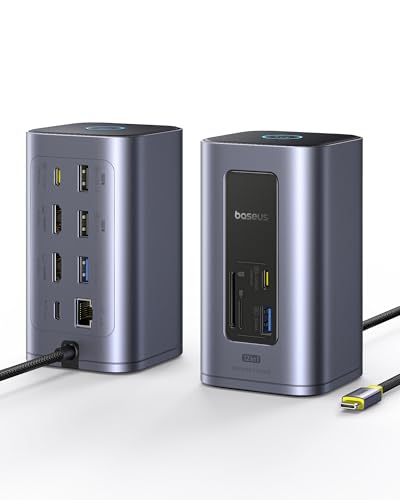
The Baseus Docking Station Dual Monitor, Nomos Win Air (12 in 1) is ideal for professionals and tech enthusiasts who use Compatible Windows Laptops such as Dell, HP, Lenovo, and Asus. If you require a powerful and versatile docking solution to expand your connectivity options, improve productivity with dual 4K HDMI displays, and enjoy fast data transfer and charging capabilities, this docking station is designed for you.
Pros:
- Supports dual 4K HDMI displays for enhanced multitasking and visual clarity
- Offers 12 in 1 connectivity including 10Gbps USB ports and 1Gbps Ethernet for fast and stable internet
- High power delivery with PD 100W ensures efficient charging of laptops and devices
- Compact and sleek grey design with dimensions suitable for any desk setup
- Compatible with major Windows laptop brands: Dell, HP, Lenovo, Asus
Cons:
- Limited compatibility with non-Windows or Mac devices
- Relatively heavier weight at 1.37 pounds may reduce portability
- May require external power source for full functionality
The Baseus Nomos Win Air Docking Station offers an impressive set of features tailored to maximize the capabilities of your Windows laptop. With dual 4K HDMI ports, users can seamlessly connect two external monitors, significantly enhancing productivity through expanded screen real estate. The inclusion of 10Gbps USB ports means rapid data transfers, ideal for professionals working with large files or multiple peripherals. Additionally, the 1Gbps Ethernet port provides a reliable wired internet connection, crucial for uninterrupted online work and streaming.
Beyond connectivity, the docking station supports 100W Power Delivery (PD), allowing you to charge your laptop and other USB-C devices efficiently without extra adapters. Its compact and stylish grey casing, measuring just 2.91 by 4.72 by 6.46 inches, fits neatly on any workspace without clutter. Overall, this docking station is a robust and versatile accessory that enhances workflow, making it an excellent investment for anyone looking to expand their laptop’s functionality and maintain a tidy, efficient workstation.
To buy this product, click here.
8. Acer Docking Station

The Acer Docking Station 3 Monitors is perfect for professionals and tech enthusiasts who require a powerful and versatile docking solution. Ideal for users with multiple devices such as Acer, Dell, Mac, or HP laptops, this docking station enhances productivity by supporting up to three monitors and providing extensive connectivity options.
Pros:
- Supports triple display with DP 8K and dual HDMI 4K@60Hz outputs
- Offers 11-in-1 ports including Ethernet, 10Gbps data transfer, and SD/TF card readers
- Provides 100W Power Delivery (PD) for fast and reliable charging
- Comes with a detachable cable for flexible setup and easy portability
- Elegant silver color design complements modern workspaces
Cons:
- Compatibility primarily optimized for certain laptop brands, may require drivers for others
- Higher price point compared to basic docking stations
- Bulkier design might not suit minimalistic desk setups
The Acer Docking Station stands out with its ability to connect up to three monitors simultaneously, featuring an impressive DP 8K output alongside dual HDMI 4K@60Hz ports. This capability allows users to enjoy crystal-clear visuals and expansive screen real estate, perfect for multitasking, video editing, and immersive presentations. Additionally, the inclusion of high-speed 10Gbps data transfer ports and Ethernet connectivity ensures seamless networking and rapid file sharing, boosting overall efficiency.
Designed with convenience in mind, this docking station supports 100W Power Delivery to keep your laptop and connected devices charged without the clutter of extra cables. The detachable cable adds flexibility, allowing users to customize their setup and easily transport the dock when needed. Its sleek silver color and sturdy build make it not only a functional hub but also an attractive addition to any professional workspace.
To buy this product, click here.
Frequently Asked Questions
What Ports Are Essential In A Gaming Laptop Dock?
A good gaming dock should include USB Type-C, Type-A, HDMI, DisplayPort, Ethernet, SD card reader, and audio jacks. These ports enable multiple device connections, fast data transfer, and dual or triple 4K monitor support, enhancing gaming and multitasking experiences.
Can Gaming Docks Support Multiple 4k Monitors Simultaneously?
Yes, many gaming docks support dual or triple 4K monitors at high refresh rates. For example, Razer docks offer up to three 4K displays at 144Hz, perfect for immersive gaming and productivity setups.
Do Gaming Docks Provide Fast Charging For Laptops And Phones?
Most premium gaming docks offer power delivery up to 140W. This supports fast charging for laptops and phones while connected, ensuring uninterrupted gaming and device use without needing separate chargers.
Are Gaming Docks Compatible With Both Windows And Mac Laptops?
Yes, many gaming docks like Razer and Baseus models support both Windows and Mac. They offer cross-platform compatibility to work seamlessly with various laptop brands and operating systems.
How Important Is Active Cooling In Gaming Laptop Docks?
Active cooling is crucial for high-performance docks. It prevents overheating during intense gaming sessions and heavy data transfer, ensuring stable performance and longer device lifespan.
Can A Gaming Dock Improve Ethernet Connectivity For Online Gaming?
Yes, gaming docks with Gigabit Ethernet ports provide faster, more stable wired internet connections. This reduces latency and lag, improving online gaming experiences significantly.
Conclusion
Choosing the right gaming dock can greatly improve your laptop setup. These docks offer multiple ports, fast charging, and support for high-resolution monitors. Whether you need dual or triple display options, there is a dock to fit your needs. Compatibility with Windows and Mac ensures you can find a suitable option.
Features like Ethernet, USB-C, and audio ports help connect all your devices easily. Lightweight and durable designs make them easy to carry. Fast data transfer speeds keep your games running smoothly. With these docks, you can enjoy better graphics and more screen space.
This makes gaming and multitasking more enjoyable. Take time to compare features and choose what fits your laptop and gaming style best. A good gaming dock is a smart investment for any serious laptop gamer.